How to hide photos on iPhone so no one can find them
iOS has hidden a photo album since 2014, and since iOS 16 it locks behind Face ID. For most situations that is enough. But "enough" depends on who is holding your phone — and the built-in Hidden album has one weakness that catches people out.
Option 1: the built-in Hidden album
- Open Photos and tap the photo or video you want to hide.
- Tap the More button (three dots) and choose Hide.
- Confirm. The item moves to Utilities → Hidden at the bottom of your library.
On iOS 16 and later the Hidden album is locked with Face ID, Touch ID or your passcode by default. You can also hide the album entirely: Settings → Apps → Photos, then turn off Show Hidden Album.
Where this falls short
The album is still called "Hidden", and anyone who has watched a single tutorial knows where to look. More importantly, if someone is standing next to you when you unlock your phone — or if they know your passcode, which is common among couples, family and roommates — the Face ID lock does not help. Hiding something in a place everyone knows about only works if nobody thinks to look.
Option 2: a separate app that does not look like one
The alternative is to move private photos out of the Photos app entirely, into an app that gives no sign of holding anything. That is what a calculator vault does: on your home screen it is a calculator, it opens as a calculator, and it calculates. Type a secret PIN on the keypad and a private vault opens instead.
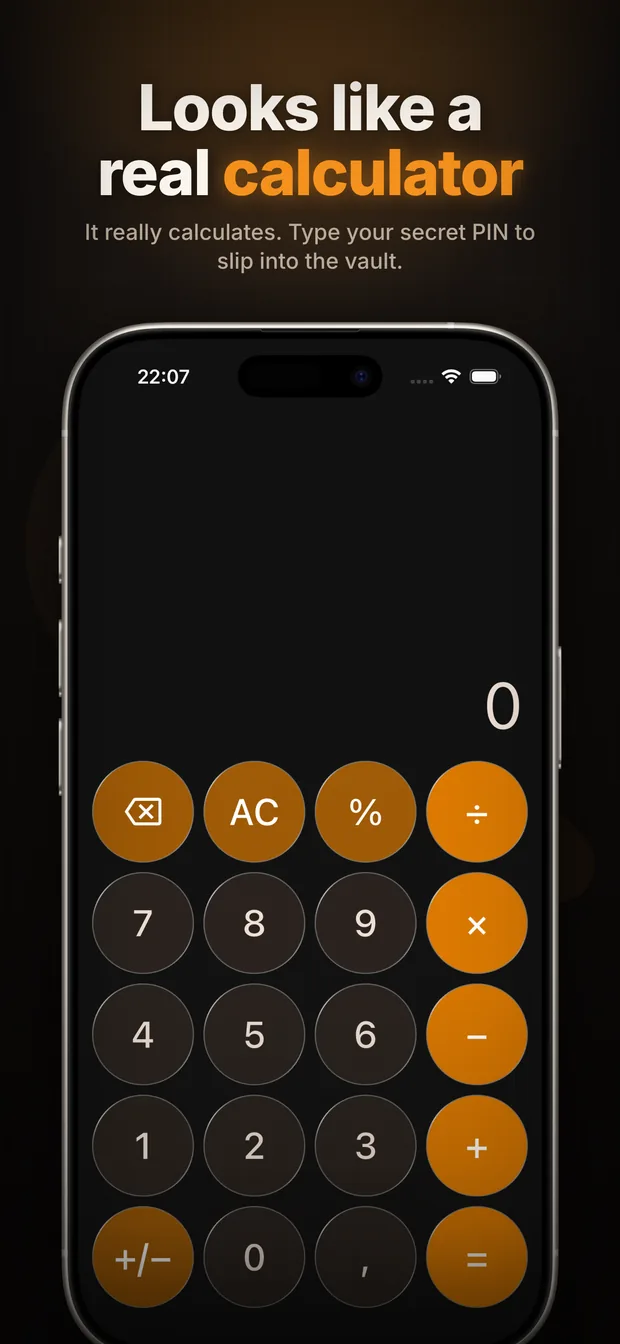
The difference is not stronger encryption — it is that there is nothing to ask about. A locked folder invites the question "what's in there?" A calculator does not.
How to set it up
- Install Calculator Vault from the App Store.
- On first launch, set your PIN. This is what you will type on the calculator keypad to get in — pick something you would not type by accident.
- Set your security questions or save the recovery code. Nothing is stored on a server, so if you lose both, the vault cannot be opened. Not by you, and not by us.
- Import photos and videos from your library, or take new ones inside the app so they never touch Photos at all.
- Delete the originals. Importing copies them in; it does not remove them from your library. Then empty Recently Deleted, or they sit there for 30 days.
Things people get wrong
iCloud Photos keeps a copy
If iCloud Photos is on, a photo you hide is still synced — it appears in the Hidden album on your iPad and on iCloud.com. Hiding is not the same as removing. Moving a photo into a vault app and deleting the original does take it out of iCloud, after Recently Deleted is emptied.
Shared albums and widgets
A hidden photo that was already in a Shared Album stays visible there. Photo widgets and the Memories feature draw from your library, not from Hidden, so those are safe — but check your Shared Albums before assuming something is private.
Backups
Everything in Calculator Vault lives on your device. That is the privacy benefit, and it is also the risk: if the phone is lost or wiped, the vault goes with it. Keep a copy of anything irreplaceable somewhere else.
Which one should you use
If you are hiding a surprise gift photo from a partner who shares your phone, the built-in Hidden album is fine. If the concern is someone who would go looking — or you simply hand your phone to other people often — the calculator approach is the one that holds up, because it does not announce that there is anything to find.
Frequently asked questions
Does hiding a photo on iPhone delete it from iCloud?
No. A hidden photo is still synced to iCloud and appears in the Hidden album on your other devices and on iCloud.com. To take it out of iCloud you have to delete it from your library and then empty Recently Deleted.
Can someone find my Hidden album on iPhone?
Yes. It sits under Utilities in the Photos app and is well known. On iOS 16 and later it is locked with Face ID or your passcode, but anyone who knows your passcode can open it.
Is a calculator vault app safer than the Hidden album?
It is not about stronger encryption — it is about not drawing attention. The Hidden album tells anyone who opens Photos that you are hiding something. A calculator gives no such signal.
What happens to my photos if I delete the vault app?
They go with it. Everything is stored on the device inside the app, so export anything you want to keep before uninstalling.
Do I need to delete the original after importing to a vault?
Yes. Importing copies the photo into the vault; the original stays in your library until you delete it and empty Recently Deleted.
Get Calculator Vault